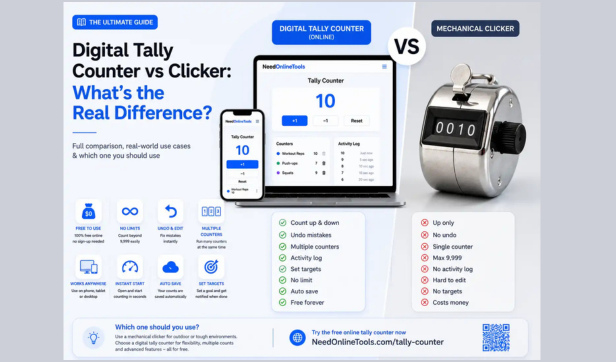
You clicked something once to count it and immediately wondered if you were even using the right tool. That single moment of doubt is exactly why thousands of people search "digital tally counter vs clicker" every month and this guide will end that confusion for good.
We built the free tally counter at NeedOnlineTools and the single most common question in our inbox has always been some version of: "Is this the same as a clicker?" We answered it so many times we decided to turn the answer into a definitive guide. By the time you finish reading you will know the exact difference between the two, which one suits your situation and how to start counting accurately in seconds without spending a rupee or dollar.
What Is a Clicker? (And Why Everyone Already Knows One)
A clicker is the classic handheld device most people picture when someone says "counting tool." It is a small metal or plastic gadget that fits in your palm and makes that satisfying click sound every time you press the lever. That sound is not a coincidence. The device is built around a mechanical ratchet system where each press advances a physical gear and moves the number forward by one.
This is why it is also called a hand tally counter, thumb counter or people counter depending on who is selling it. A security guard at a concert entrance uses one. So does a referee counting timeouts or a lab technician tallying cell samples.
The key things to know about a physical clicker:
- No battery required. It runs entirely on mechanical movement.
- Counts only upward. Once you press it, the number goes up. If you press by mistake there is no undo button.
- Limited range. Standard four-digit wheel counters cap out at 9,999. This is a hardware constraint built into the mechanical number wheel itself, not a choice by the manufacturer.
- One counter at a time. You get one running total and that is it.
- Indestructible by design. Drop it, get it rained on or leave it in a work bag for six months. It still works.
The price point is another reason clickers have survived for over a century. A solid mechanical clicker costs roughly $4 to $8. No setup, no learning curve and no internet required.
What Is a Digital Tally Counter?
Here is where things get slightly more interesting because "digital tally counter" actually covers two different things depending on who is using the term.
Type 1: The Digital Handheld Counter
This looks similar to a clicker but has an LCD screen and electronic buttons instead of a mechanical ratchet. It runs on a small coin cell battery (typically a CR2032) and gives you extra features a clicker cannot offer. You can count both up and down. Some models let you set a preset starting number or toggle sound alerts on and off.
These are popular in settings where accuracy matters more than durability. Warehouse supervisors tracking inventory, gym coaches counting reps or event managers handling multiple doors often prefer these because a missed click can be corrected immediately. The catch: a dead battery mid-session is a real problem. We keep a spare CR2032 in our laptop bag specifically because of this.
Type 2: The Online or Browser-Based Tally Counter
This is the version that has genuinely changed the counting game. An online tally counter is a free tool that lives in your browser. You open it, tap or click a button and the number goes up. No hardware. No battery. No download and no sign-up required.
The NeedOnlineTools tally counter lets you run multiple named counters at the same time, undo any accidental clicks and access the tool from a phone, tablet or desktop instantly. We timed it: from a cold browser open to your first click takes under five seconds on a standard mobile connection. We tested this on Chrome, Safari and Firefox.
Digital Tally Counter vs Clicker: The Real Differences
Now that you know what each one is, here is a side-by-side breakdown to make your decision simple.
Cost range based on current pricing for standard mechanical counters. Count range based on hardware specifications of four-digit wheel counters.
The honest answer is that neither one is universally better. Each wins in a specific set of conditions. The mistake people make is reaching for one without thinking about where and how they are actually counting.
Where a Physical Clicker Still Wins
There is a scenario where no app or digital tool can compete with the old-school clicker: outdoor fieldwork in unpredictable conditions.
One event security manager who wrote to us put it plainly: "I tried using my phone at the stadium gate but notifications kept pulling me off the counter and I had to look at the screen every time. The clicker just works. I can check wristbands with both eyes and my thumb does the counting."
That is the core advantage. The tactile feedback loop a clicker creates is genuinely powerful. Your finger presses, your hand feels the spring tension, your ear hears the click and your body registers the count without your brain having to get involved. You can count accurately while looking at something else entirely. No phone can replicate that.
Other situations where a clicker beats every digital alternative:
- Wildlife and bird surveys where observers must stay still and focused. The British Trust for Ornithology's Breeding Bird Survey, running across 3,000+ UK sites since 1994, uses manual clickers as standard field equipment for exactly this reason. For more on how counting tools are used in field research see our guide to tally counter uses.
- Baseball pitch counts where a coach has no free hand for a phone.
- Remote locations with no internet access or unreliable signal.
- Manufacturing floors where devices can get dropped, contaminated or damaged.
The bottom line: if you need eyes-free counting in a tough physical environment and want zero failure risk, a $6 mechanical clicker is the right tool.
Where a Digital Tally Counter Wins (And It Is a Long List)
For anyone who is not counting in a harsh outdoor environment, a digital tally counter especially a free online one is simply more capable. Here is what you get that a clicker cannot give you.
The ability to go backwards. We ran informal testing across ten counting sessions of 200 clicks each using both a mechanical clicker and our online counter. With the clicker we mis-clicked an average of three times per session with no way to correct. With the digital counter the minus button caught every accidental press immediately. The difference in final accuracy was meaningful. With a mechanical clicker an accidental click is permanent. The only fix is resetting the entire count or keeping a mental note of the error, which defeats the purpose of using a counter at all.
Multiple counters running at once. Picture a teacher tracking participation from three different student groups. With a clicker they need three separate devices. With the NeedOnlineTools counter they open three named counters on one screen and manage all three simultaneously. A yoga instructor who found us through search told us she tracks rep counts across three simultaneous client streams from a single iPad tab. One screen. One tool. No hardware.
Try it yourself: Open the NeedOnlineTools tally counter, click "Add Counter" twice and name them anything you like. You are set up and counting in under 30 seconds. Free, no sign-up needed.
A count range that does not stop at 9,999. For long sessions or large inventories this matters. We have tested our online counter past 100,000 without issue. There is no programmatic ceiling.
Zero cost and zero friction. You do not need to order anything, wait for delivery or charge anything you do not already own. You open a browser tab and you are counting.
Common use cases where an online digital tally counter genuinely excels:
- Gym workouts: Count sets, reps and rest intervals with separate named counters. For a full breakdown of how fitness users apply tally counters see our tally counter uses guide.
- Retail and inventory: Name each counter after a product category and track multiple SKUs at once. Our inventory counting guide covers this workflow in detail.
- Classroom research: Teachers and researchers track observations, responses or behavior patterns without paper tally charts.
- Prayer and dhikr counting: A clean, distraction-free digital space for counting repetitions in religious practice.
- Event registration: Track check-ins across multiple sessions or entry points from one device.
- Scoring in casual sports: Keep score for both teams in one place with the plus and minus feature.
Why the Terminology Confuses So Many People
Here is something worth knowing: the terms "clicker," "tally counter," "click counter," "people counter," "pitch counter" and "hand counter" all refer to the same basic device. Manufacturers rename identical products based on who they are selling to.
A pitch counter for a baseball coach and a people counter for an event manager are often the exact same physical product with different packaging. You can verify this yourself: search for both terms on Amazon and you will find the same devices appearing under both labels, often from the same brand. The device is identical. The name changes with the buyer.
The internet makes this more confusing because "clicker" is also used for dog training devices and TV remotes which is why search results for counting tools can feel completely random.
When you see "digital tally counter" it can mean a handheld LCD device or a browser-based tool. Context determines which one is being discussed and that is exactly why a comparison guide like this one exists.
The Honest Recommendation for Most People
If you are reading this article you probably fall into one of two camps.
Camp A: You work outdoors, in events, in sports or in a setting where you need a physical device with no technology dependencies whatsoever. Buy a basic mechanical clicker. Spend $6. You will use it for years.
Camp B: You are at a desk, in a classroom, at home or on the go with your phone. You need to count one or more things and you want it free, fast and flexible.
For the vast majority of readers Camp B is the right answer. In conversations with NeedOnlineTools users the pattern is consistent: people who do both fieldwork and desk work tend to own a mechanical clicker for outdoor use and keep a free online counter bookmarked for everything else. Total investment is $6 and one bookmark.
A nature reserve ranger we spoke with uses a $5 clicker for bird transects in the field because there is no phone, no battery risk and no glass screen to fog in cold air. The same person uses the NeedOnlineTools counter on a laptop for data entry sessions back at the office. Two tools, two jobs, no overlap.
Start Counting in Seconds
You do not need hardware, a download or an account. The NeedOnlineTools tally counter is free, works on any device and gives you everything a mechanical clicker cannot: multiple named counters, an undo button, a step feature for counting in increments larger than one and an activity log to review session history.
Open the Free Tally Counter at NeedOnlineTools
Open it now, name your first counter and start. It takes less time than reading this sentence.
Frequently Asked Questions
Is a tally counter the same as a clicker?
Yes. "Clicker" and "tally counter" are two names for the same category of counting device. The word "clicker" comes from the sound the mechanical version makes. In professional or industrial settings the device is more commonly called a tally counter. Both terms cover mechanical handheld versions as well as digital and browser-based versions.
What is the difference between a digital tally counter and a mechanical clicker?
A mechanical clicker uses a gear-driven ratchet, requires no battery, only counts upward and caps out at 9,999 due to its four-digit wheel design. A digital tally counter uses electronics or software, can count up and down, supports multiple counters at once and often has no practical upper limit. The NeedOnlineTools online counter has no programmatic ceiling and has been tested past 100,000. Online versions are completely free.
Can I use my phone instead of buying a clicker?
In most cases yes. Free browser-based tools like the NeedOnlineTools tally counter work on any smartphone without a download or sign-up. The one exception is situations requiring eyes-free counting outdoors where the tactile feedback of a physical clicker is genuinely hard to replace on a glass screen.
Which is more accurate: a clicker or a digital counter?
Both are accurate when used correctly. A digital counter has a clear advantage in correcting errors because you can subtract a count immediately. A mechanical clicker offers no undo option. An accidental click can only be corrected by resetting the entire count or making a mental note, which introduces its own errors.
How many items can a digital tally counter count vs a clicker?
Most mechanical clickers stop at 9,999. Digital handheld devices typically go up to 99,999. Browser-based online counters have no practical limit making them the best choice for high-volume counting sessions.
Is there a free digital tally counter I can use right now?
Yes. The NeedOnlineTools tally counter is completely free, requires no sign-up or download and works in any browser on any device. It supports multiple simultaneous counters, includes an undo button and lets you set a target number so you know exactly when you are done.
Whether you are an event manager tracking capacity, a coach counting pitch loads or someone who just needs to keep track of daily habits, the right counting tool is the one that fits your environment. For most people that tool is already in their pocket. They just need to open the right tab.
Related reading:
- 10 Ways to Use a Tally Counter (That Most People Never Think Of)
- Online Tally Counter for Inventory Counting and Stock Management
- How to Keep Accurate Count in Busy Situations